Workflow Optimization Meaning for Church Leaders

Workflow Optimization Meaning for Church Leaders
Workflow optimization is defined as the systematic process of analyzing, refining, and improving how work gets done to reduce waste, cut delays, and produce better results with the same or fewer resources. For church administrators and ministry leaders, this definition carries real weight. Your teams run board meetings, committee sessions, volunteer coordination calls, and pastoral planning sessions constantly, often without dedicated admin support to document or follow up on any of it. Optimizing those workflows can improve organizational efficiency by 5–15%, and 60% of organizations achieve a return on investment within 12 months. That is not a corporate metric. It applies directly to how your ministry spends its time and energy.
What does workflow optimization mean in practice?
The workflow optimization definition goes beyond simply working faster. The standard industry term for this discipline is Business Process Management, or BPM, and it covers the full cycle of mapping, analyzing, improving, and monitoring how tasks move through an organization. Workflow optimization is the improvement phase of that cycle. It asks: where are tasks getting stuck, duplicated, or dropped? Then it fixes those points deliberately.
The core strategies break down into five areas:
- Map your workflows. Document every step of a process as it actually happens, not as you think it happens. For a church board meeting, that means tracing the path from agenda creation to decision recording to follow-up assignment.
- Identify bottlenecks and redundant steps. A bottleneck is any point where work slows because one person or step cannot keep up. Redundancy is any step that duplicates effort already done elsewhere.
- Standardize repeatable tasks. Create templates, checklists, and defined roles so the same process produces the same result every time. A church board meeting template is a direct example of standardization in action.
- Automate rule-based tasks. Automation works best on repetitive, rule-based tasks, freeing up human time for work that requires judgment, creativity, and relationship.
- Measure and refine continuously. Set key performance indicators (KPIs) for each process and review them regularly. Optimization is not a one-time project.
Pro Tip: Target one high-friction process at a time. Changing everything at once makes it impossible to know what actually worked. Fix the meeting documentation bottleneck first, measure the result, then move to the next problem.
The human side of this matters as much as the technical side. Workflow optimization works best when it makes processes easier for the people doing the work, not just more efficient on paper. Involve your team in identifying what slows them down. Their feedback will surface problems that no process map ever will.

How does workflow improvement help church meetings and admin tasks?
Church meetings carry a specific set of inefficiencies that most workflow guides never address. Agendas arrive late or not at all. Decisions get made verbally but never recorded. Action items fall through because no one owns them. The same topics resurface meeting after meeting because there is no clear record of what was resolved.
Applying workflow improvement strategies to your meeting cycle produces four concrete gains:
- Shorter meetings. A standardized agenda template with time limits per item cuts meeting length without cutting substance. When everyone knows the format, preparation improves and discussion stays focused.
- Clearer decisions. Optimized workflows reduce errors and improve accountability across teams. When decisions are recorded in a consistent format, ambiguity drops and follow-through improves.
- Better task follow-up. Assigning action items with owners and deadlines during the meeting, then distributing written summaries immediately after, closes the gap between what was decided and what actually happens.
- Reduced admin burden. Automating meeting documentation removes the manual note-taking load from one volunteer or staff member. That person can participate fully in the meeting instead of transcribing it.
The nonprofit and ministry context adds one more layer. Church staff and volunteers are often stretched thin. Systematic workflow strategies can decrease operational expenses by up to 30%. For a ministry operating on a tight budget, that kind of efficiency gain translates directly into more resources for mission-focused work.
Consider a practical example. A church elder board meets monthly. Before optimization, the secretary spent two hours after each meeting writing up minutes from handwritten notes, then emailed a draft to the pastor for review, then revised and distributed. The whole cycle took three to four days. After optimization, a structured agenda template was introduced, action items were captured in a shared document during the meeting, and an AI documentation tool generated the draft summary automatically. The cycle dropped to under an hour. The secretary’s time was redirected to member care follow-up instead.
What tools support effective workflow improvement?
The right tools depend on your ministry’s size, technical comfort level, and the specific processes you are fixing. Three categories of tools address most church workflow needs.
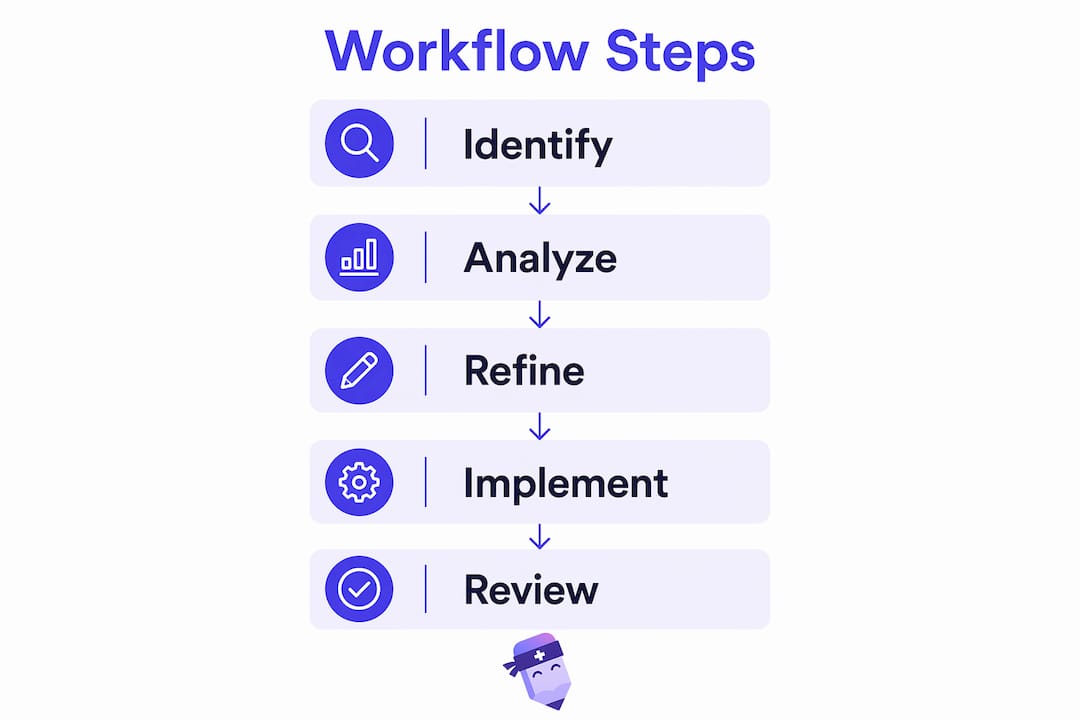
Workflow mapping tools help you visualize how a process currently works. Simple options include whiteboard diagrams or flowchart software. The goal is to see every step, every handoff, and every decision point laid out clearly before you start changing anything.
BPM and task management platforms handle assignment, tracking, and accountability. 36% of organizations are implementing BPM software to support their optimization efforts. These platforms let you assign tasks, set deadlines, and track completion without relying on email threads or verbal reminders.
AI-powered documentation tools address the meeting documentation bottleneck directly. Rather than having a staff member transcribe notes manually, these tools generate structured summaries from recordings or live conversations. Readypen is built specifically for this use case in churches and ministry organizations. It produces meeting notes, summaries, and structured documents automatically, which means your team leaves every meeting with a written record already in progress.
Pro Tip: Before selecting any tool, list the three processes that cause your team the most friction. Choose a tool that solves at least two of those three problems. A tool that solves a problem you do not have is just another subscription to manage.
Metrics matter too. Track meeting length over time, the number of action items completed before the next meeting, and the time between a meeting and the distribution of its minutes. Those three KPIs alone will tell you whether your workflow changes are working.
What pitfalls should church leaders avoid when improving workflows?
The most common mistake is attempting a full overhaul of every process at once. Successful optimization relies on targeted, iterative improvements on high-friction steps, not wholesale infrastructure changes. Large overhauls create confusion, resistance, and no clear baseline for measuring what worked.
A second major pitfall is the gap between documented processes and what people actually do. This gap is called a shadow workflow. Shadow workflows are the unofficial workarounds your team has developed because the official process does not fit how work actually flows. If you optimize the documented process without addressing the shadow workflow, nothing changes in practice.
Three more pitfalls to watch for:
- Skipping the measurement step. Changing a process without tracking a before and after metric makes it impossible to know whether the change helped.
- Neglecting ongoing maintenance. Workflow optimization requires continuous upkeep, similar to road maintenance. A process that works well today will degrade as your team grows, your ministry evolves, and new tools enter the picture.
- Losing the personal touch. Automation handles documentation and reminders well. It does not replace pastoral judgment, relationship-building, or the human discernment that ministry requires. Keep automation in its lane.
Engage your team throughout the process. Ask the person who takes meeting minutes what slows them down. Ask committee chairs what information they wish they had before each meeting. Their answers will identify the real friction points faster than any process audit.
Key Takeaways
Workflow optimization is the deliberate, continuous process of improving how work gets done, and for ministry leaders, it starts with fixing meeting documentation and task follow-up before anything else.
| Point | Details |
|---|---|
| Core definition | Workflow optimization means analyzing and improving work processes to reduce waste and increase output. |
| Start with meetings | Church meeting workflows are a high-impact, low-complexity starting point for visible efficiency gains. |
| Automate documentation | AI tools that generate meeting summaries free staff time for relationship and mission work. |
| Iterate, don’t overhaul | Fix one high-friction process at a time and measure the result before moving to the next. |
| Maintain continuously | Treat optimized workflows like infrastructure. Review and update them as your ministry grows. |
Why I think most churches are sitting on a fixable problem
Church leaders talk a lot about stewardship of finances. They talk far less about stewardship of time, which is the resource most ministry teams are actually running out of. I have watched capable, committed church administrators spend hours every week on tasks that a well-designed process or a simple tool could handle in minutes. The bottleneck is almost never effort. It is almost always process.
The most revealing thing I have seen is what happens when a church team maps their meeting workflow for the first time. They almost always discover that the same information gets communicated three or four times through different channels, that no one person owns the follow-up step, and that the person taking notes is so busy writing that they cannot participate in the discussion. These are not unique problems. They are the default state of an unoptimized meeting process.
My honest observation is that most church leaders underestimate how much a single process fix can change the feel of their organization. Fixing meeting documentation alone, just that one step, tends to improve morale, reduce repeated conversations, and give leaders more confidence that decisions are actually being carried out. That is not a small thing. It is the difference between a team that feels like it is spinning and a team that feels like it is moving.
Start with your next meeting. Map what happens from agenda creation to minutes distribution. Count the steps. Count the handoffs. Then ask which one step, if removed or automated, would save the most time. That answer is your starting point.
— Robbie
Readypen and church meeting documentation
Church administrators who want to put workflow improvement into practice immediately have a direct starting point in meeting documentation. Readypen is an AI-powered meeting notes tool built specifically for churches, pastors, and ministry teams. It automatically generates meeting summaries, structured notes, and follow-up documents from conversations or recordings, removing the manual transcription step entirely.
Ministry teams using Readypen leave every meeting with a written record already drafted, action items captured, and a summary ready to distribute. That single change addresses the most common meeting workflow failure point. If your team is still relying on handwritten notes and a two-day turnaround for minutes, explore AI meeting documentation built for the way churches actually work. You can also review the church meeting minutes guide to understand best practices before you automate.
FAQ
What is the workflow optimization definition?
Workflow optimization is the process of analyzing existing work processes, identifying inefficiencies, and making targeted improvements to increase output and reduce wasted time or resources. It is an ongoing discipline, not a one-time project.
How does workflow optimization improve meeting efficiency?
Optimized meeting workflows reduce preparation time, shorten meeting length, and improve follow-through on decisions by standardizing agendas, documenting outcomes consistently, and assigning clear ownership of action items.
What does BPM mean in workflow optimization?
BPM stands for Business Process Management, the formal discipline that covers mapping, analyzing, improving, and monitoring organizational workflows. Workflow optimization is the improvement phase within BPM.
How can churches start optimizing their workflows?
Start by mapping one high-friction process, such as meeting documentation, and identify the steps that cause the most delay or confusion. Fix those steps first, measure the result, and then move to the next process.
What is a shadow workflow?
A shadow workflow is the unofficial workaround a team uses when the documented process does not match how work actually flows. Identifying and addressing shadow workflows is critical to making any optimization effort stick.
Recommended
- ReadyPen - AI Meeting Documentation for Churches | Automated Minutes & Summaries
- ReadyPen - AI Meeting Documentation for Churches | Automated Minutes & Summaries
- ReadyPen - AI Meeting Documentation for Churches | Automated Minutes & Summaries
- ReadyPen - AI Meeting Documentation for Churches | Automated Minutes & Summaries