What Is a Shared Document Workspace? 2026 Guide

What Is a Shared Document Workspace? 2026 Guide
A shared document workspace is a persistent, cloud-based collaboration environment where multiple users co-author, review, and manage documents with real-time access and scoped permissions. Unlike emailing attachments back and forth, platforms like Google Workspace, Microsoft OneDrive, and Slack integrate document editing, commenting, and version history into a single environment. Every team member sees the same current version. Every edit is attributed to a specific person. The result is a single source of truth that replaces fragmented file chaos with structured, accountable collaboration.
What is a shared document workspace and how does it work?
A shared document workspace is defined as a cloud-based, multi-user platform where documents persist in a continuous state, meaning they are always live, always current, and always accessible to the right people. This is fundamentally different from sending a Word file as an email attachment. The document lives in the workspace, not in someone’s inbox.
The core features that define a true shared workspace include real-time co-authoring, version history, attributed writes, and permissions scoped to the workspace rather than individual files. Real-time co-authoring means two people can edit the same paragraph simultaneously without overwriting each other. Attributed writes mean every change is tied to a specific user identity, creating a clear audit trail.

Permissions in platforms like Google Workspace operate at the workspace level. Revoking shared drive membership removes access to all files in that drive at once. That single action replaces the tedious process of removing a person from dozens of individual shared files.
Document collaboration tools also provide presence indicators, integrated commenting, and approval workflows. These features make hybrid and remote team productivity measurably stronger because everyone works from the same document state, regardless of location or device.
Core features vs. traditional file sharing
Transitioning from email-attached workflows to shared workspaces eliminates version control problems and improves project alignment. Teams gain 100% visibility into edits and immediate access to the current document version. That visibility removes the common frustration of working on an outdated draft.
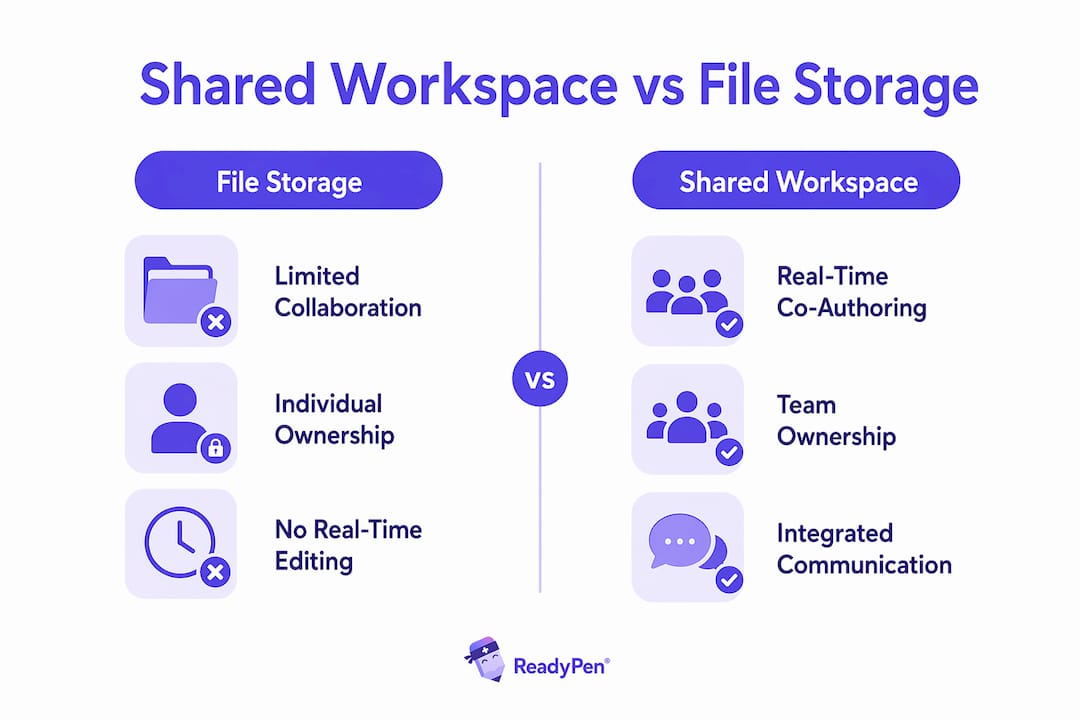
Traditional file sharing tools move files between people. Shared workspaces keep files in one place and bring people to them. The distinction sounds subtle, but the operational difference is significant.
Key advantages of shared workspaces over traditional file sharing include:
- No version conflicts. Everyone edits the live document, not a copy.
- Integrated feedback. Comments and suggestions live inside the document, not in a separate email thread.
- Instant access. New team members access the full document history from day one.
- Accountability. Every edit is attributed to a named user.
- Reduced admin work. Permissions are managed at the workspace level, not file by file.
Pro Tip: Designate one document as the official “system of record” for each project. When teams create multiple working copies, document sprawl sets in fast. One authoritative document, clearly labeled, prevents that problem before it starts.
How do security and compliance standards apply?
Security in shared workspaces is not optional for business use. Compliance-grade workspaces require at least 256-bit AES encryption, granular access controls, and audit logging. These three features form the baseline for handling sensitive business data.
For organizations in regulated industries, the requirements go further. Healthcare teams need providers that offer signed Business Associate Agreements (BAAs) for HIPAA compliance and 24/7 file monitoring. ISO 27001 certification signals that a provider has independently verified its security controls. These are not marketing claims. They are auditable standards.
The table below summarizes key security features and their compliance relevance:
| Security Feature | Compliance Relevance |
|---|---|
| 256-bit AES encryption | Required for HIPAA, ISO 27001 |
| Role-based access control | Limits exposure of sensitive documents |
| Audit logging | Provides traceable record for compliance reviews |
| Access revocation | Removes user access instantly across all files |
| Signed BAAs | Required for HIPAA-covered healthcare entities |
| 24/7 monitoring | Detects unauthorized access in real time |
Access revocation is one of the most underrated security features in shared workspaces. When an employee leaves or a contractor’s project ends, one action removes their access to every document in the workspace. Without that capability, teams often leave former members with lingering access they forget to clean up.
Pro Tip: Define owner, editor, and viewer roles before the first document is created. Permission creep is one of the most common failure points in collaborative projects. Starting with clear role definitions prevents it.
Shared workspace vs. file storage: what is the real difference?
File storage and shared workspaces are not the same thing, even though many teams treat them as interchangeable. The defining difference is the persistence of collaboration context. A file storage system holds files. A shared workspace holds the work itself, including the conversations, edits, and decisions made around those files.
Platforms used purely as storage lack persistent contextual workspace features such as attributed writes, conversation anchoring, and workspace membership management. When teams use a basic storage tool as their collaboration environment, they end up with document sprawl and permission creep. Files multiply. Access becomes inconsistent. No one knows which version is final.
The comparison table below clarifies the distinction:
| Feature | File Storage | Shared Document Workspace |
|---|---|---|
| Document ownership | Individual user | Organization or workspace |
| Real-time co-authoring | No | Yes |
| Attributed writes | No | Yes |
| Persistent collaboration context | No | Yes |
| Workspace-level permissions | No | Yes |
| Integrated commenting | Limited | Full |
A true shared workspace also includes agent identities as first-class members. Every write, whether by a human or an automated agent, is attributed and scoped to the workspace. That design choice is what makes workspaces auditable and trustworthy at scale.
Top-performing teams treat documents as living entities integrated with meetings, comments, and discussions. That integration builds a single source of truth and prevents the information loss that happens when decisions get made in a meeting but never make it into the document.
Best practices for using a shared workspace effectively
Getting the most from a shared document workspace requires more than just picking the right tool. The way a team sets up and uses the workspace determines whether it becomes a genuine productivity asset or just another place to store files.
The following practices make the biggest difference for business teams:
- Establish document ownership upfront. Assign a named owner to every document. Owners are responsible for keeping the document current and accurate.
- Integrate communication directly in the workspace. Use in-document comments and @mentions instead of parallel email threads. This keeps decisions visible and searchable.
- Set permissions before sharing. Define who gets owner, editor, and viewer access before the document goes live. Changing permissions after the fact creates confusion and security gaps.
- Use page-level analytics for external sharing. When sharing documents with clients or investors, analytics tell you who opened the document, how long they spent on each section, and whether a bot accessed the link.
- Onboard new team members through the workspace. New hires who can read the full document history get up to speed faster than those who rely on verbal briefings.
Scaling collaboration also requires a deliberate tool strategy. Combining tools like Google Workspace for internal collaboration with security-first platforms for external sharing gives teams both usability and compliance. Internal work benefits from tight ecosystem integration. External sharing with clients or partners benefits from stricter access controls and analytics.
Pro Tip: Use your primary collaboration platform internally and a specialized, security-first tool for external document sharing. The two use cases have different risk profiles. One tool rarely handles both well.
Documentation also builds team trust over time. Teams that maintain clear, attributed records of decisions and edits create a culture of transparency and accountability that new members can see and trust from day one.
Key Takeaways
A shared document workspace is the most effective way for business teams to collaborate because it combines persistent context, attributed edits, and workspace-level permissions into a single, auditable environment.
| Point | Details |
|---|---|
| Definition matters | A shared workspace is not file storage. It is a persistent, multi-user collaboration environment with context and attribution. |
| Permissions prevent problems | Define owner, editor, and viewer roles before the first document is created to avoid permission creep. |
| Security is non-negotiable | Compliance-grade workspaces require 256-bit AES encryption, audit logs, and access revocation. |
| Treat documents as living records | Integrate comments, meetings, and decisions directly in the workspace to build a single source of truth. |
| Use a dual-tool strategy | Combine an ecosystem-integrated tool for internal work with a security-first platform for external sharing. |
Why most teams are still doing this wrong
Most teams I work with have the tools. They have Google Workspace or Microsoft 365 set up and running. What they are missing is the discipline to use those tools as actual workspaces rather than fancy file cabinets.
The most common mistake I see is treating a shared drive as a collaboration environment. Files get uploaded. Links get shared. But there is no ownership, no role structure, and no living document that reflects current decisions. When something changes, someone updates a file, sends an email about it, and hopes the right people see it. That is not collaboration. That is file chaos with extra steps.
The teams that get this right do one thing differently: they anchor decisions to documents. Every meeting produces a document. Every decision gets recorded in the workspace where the relevant files live. Comments, edits, and approvals happen inside the document, not in a separate thread. The document becomes the record, not the email.
Permissions are the other thing most teams get wrong. I have seen organizations where a contractor from two years ago still has editor access to active project files. Nobody revoked it because nobody set up a clear role structure at the start. Defining roles before the first document is shared is not overhead. It is the foundation that makes everything else work.
The shift from file sharing to true shared workspaces is not a technology problem. The tools exist. It is a habits and structure problem. Get the structure right first, and the tools will do exactly what they are designed to do.
— Robbie
How Readypen fits into your document workflow
Church staff and ministry leaders run more meetings than almost any other type of organization, and most of those meetings produce decisions that never make it into a shared document. Readypen solves that specific problem. It automatically generates meeting notes, summaries, and structured documents from conversations or recordings, so nothing gets lost between the meeting room and the shared workspace.
Readypen integrates directly into the workflow that shared workspaces are built for. The AI captures what was said, structures it into a usable document, and makes it ready to share with the right people. If you are figuring out who should take meeting minutes on your team, Readypen removes that question entirely. The documentation happens automatically. Ministry teams can also explore AI-powered meeting sessions to see how automated documentation fits their specific workflow.
FAQ
What is a shared document workspace?
A shared document workspace is a cloud-based platform where multiple users co-author, review, and manage documents with real-time editing, version history, and role-based permissions. It differs from file storage by maintaining persistent collaboration context across all team activity.
How is a shared workspace different from Google Drive?
Google Drive used as basic storage is a file repository. Google Workspace with shared drives adds workspace-level permissions, attributed writes, and real-time co-authoring, making it a true shared workspace rather than just a place to store files.
What security features should a shared workspace have?
A compliance-grade shared workspace requires 256-bit AES encryption, granular role-based access controls, audit logging, and the ability to revoke access instantly. Healthcare organizations also need signed BAAs for HIPAA compliance.
What are the best document sharing tools for business teams?
Google Workspace, Microsoft OneDrive, and Zoom Docs are widely used for internal shared document collaboration. For external sharing with clients or investors, security-first platforms with page-level analytics and bot detection provide stronger protection and business intelligence.
Why do teams fail at shared document collaboration?
The most common failure is using file storage tools as collaboration environments. Without defined roles, attributed writes, and persistent workspace context, teams end up with document sprawl, version conflicts, and permission creep that undermine the entire collaboration effort.