Meeting Workflow Automation for Church Leaders

Meeting Workflow Automation for Church Leaders
Meeting workflow automation is the technology-driven process that handles all routine meeting tasks, from transcription to action item assignment, without manual input. Church leaders and administrators run a high volume of meetings, from elder boards to staff huddles, yet rarely have dedicated admin support to document everything. Understanding what is meeting workflow automation gives your ministry a practical path to better accountability, faster follow-up, and less time spent on paperwork. Tools like Zoom Workflow Automation, Tactiq, and Circleback now make this accessible to non-technical teams, including church staff with no workflow engineering background.
What is meeting workflow automation for churches?
Meeting workflow automation is an end-to-end system that connects scheduling, transcription, post-meeting outputs like action items, and follow-up emails without any manual input. The industry term for the broader concept is meeting intelligence automation, and it covers the full chain from capturing audio to pushing structured outputs into the tools your team already uses. For church leaders, this means your board meeting notes, pastoral team decisions, and volunteer coordinator updates all get documented and distributed automatically.
The real value is not just saving time. Automation creates a consistent, traceable record of every meeting your ministry holds. That consistency builds trust with your congregation, your board, and your staff.

What are the core stages of meeting automation?
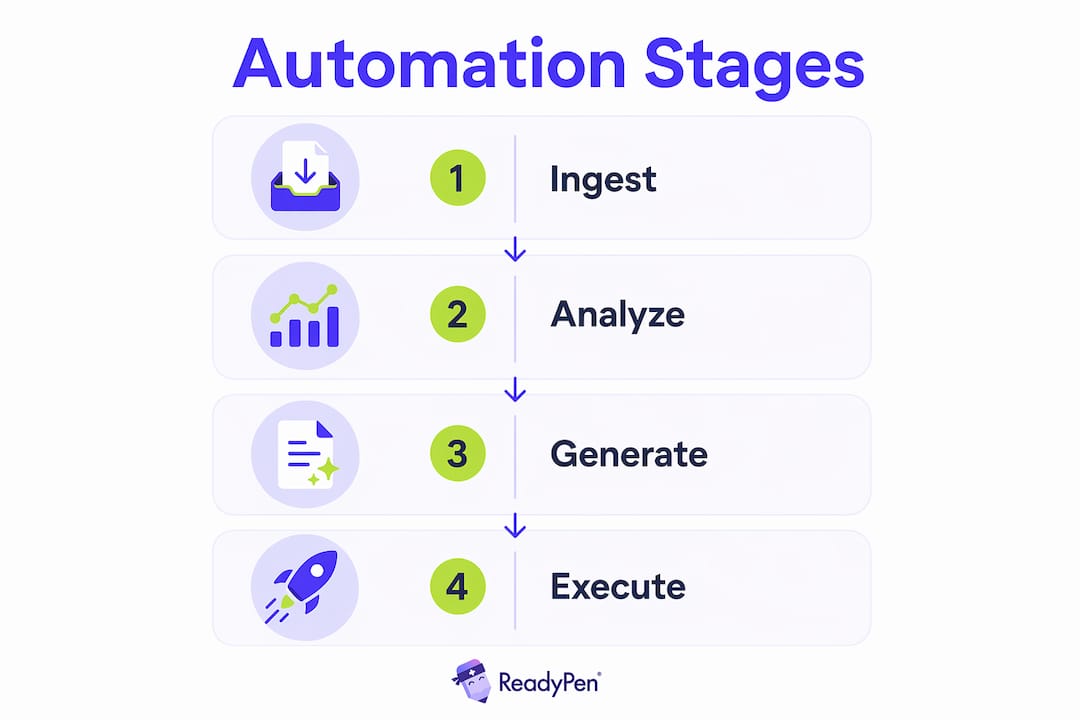
Meeting intelligence automation follows four stages: Ingest, Analyze, Generate, and Execute. Each stage builds on the previous one, and skipping any stage breaks the chain.
- Ingest. The system captures audio or video from your meeting and converts it to a raw transcript. Platforms like Zoom and Google Meet handle this natively.
- Analyze. AI reads the transcript and extracts structured insights, including decisions made, topics discussed, and tasks assigned.
- Generate. The system produces finished artifacts: a meeting summary, a list of action items with owners and deadlines, and formatted minutes.
- Execute. Outputs are automatically distributed. Summaries go to Slack or email. Tasks push to your project board. Calendar events get created for follow-up.
The Execute stage is where most church teams stop short. Completing the Execute step is what separates useful automation from a simple transcript. A transcript sitting in a folder changes nothing. A task automatically assigned to your facilities director with a deadline creates real accountability.
Pro Tip: Set up your automation to send a summary email to all attendees within 15 minutes of your meeting ending. Church staff are more likely to act on tasks they receive immediately after the conversation.
How do transcripts, action items, and summaries each serve your ministry?
Modern meeting automation platforms deliver three distinct types of output, and each one serves a different ministry need. Understanding the difference helps you choose the right tools and set the right expectations with your team.
| Output | What it contains | Best use in ministry |
|---|---|---|
| Transcript | Full word-for-word record | Legal accountability, elder board archives |
| Action items | Tasks with owner and deadline | Staff follow-through, volunteer coordination |
| Summary | Condensed key points | Quick review for absent members, pastor updates |
Transcripts are your most complete record. They are searchable, which means your church administrator can find a specific decision made six months ago in seconds. Action items are the most operationally powerful output. Structured task extraction with assigned owners and deadlines prevents tasks from getting buried in free-text notes and supports automatic calendar event creation. Summaries serve a different role entirely. They give your senior pastor or board chair a fast, readable recap without requiring them to read a full transcript.
- Transcripts support legal and governance accountability for church boards.
- Action items drive follow-through by naming a responsible person and a due date.
- Summaries keep absent staff members informed without extra communication overhead.
- Integrations push all three outputs into tools like Google Sheets, Slack, or your church management software.
Pro Tip: Ask your automation tool to flag action items that have no assigned owner. Unowned tasks are the most common reason church follow-up fails after a meeting.
How to implement meeting automation in your church
Implementing meeting automation does not require a technical team. Zoom Workflow Automation uses no-code templates that let non-technical users define ordered steps triggered by meeting outputs, automating follow-ups across Zoom and third-party apps. That approach fits church teams well because most administrators are not developers.
Start by matching your automation deliverables to your actual documentation needs. A small church with weekly staff meetings needs a different setup than a multi-site ministry running 20 meetings per week. Ask yourself what your team currently does manually after every meeting, and automate exactly that.
A practical starting pipeline looks like this:
- Connect your video platform (Zoom, Google Meet, or Microsoft Teams) to an AI transcription tool.
- Route the transcript through an AI summarization layer to generate minutes and action items.
- Push action items to your task management tool, such as Asana, Trello, or a shared Google Sheet.
- Send the summary automatically to attendees via email or Slack.
- Create follow-up calendar events for any tasks with deadlines.
A Google Meet automation pipeline can complete transcription, summarization, and task extraction quickly after a meeting, then register outputs in Sheets, send emails, and create calendar events. That same pattern works for any church using Google Workspace. For ministries on Zoom, Zoom Workflow Automation provides pre-built templates that require no coding to configure.
Permissions matter more than most church leaders expect. Every person in your automation chain needs the right access level to recordings and transcripts. Set this up before your first automated meeting, not after.
What are the common pitfalls in church meeting automation?
The most common failure in meeting automation is not a technology problem. It is a permissions and access problem. Automation pipelines must ensure proper viewing rights to recordings and transcripts, or the entire chain breaks silently. Your staff may never know the automation failed until someone asks for notes that do not exist.
“Automation that fails quietly is worse than no automation at all. At least with manual notes, someone knows they forgot.”
A second common failure is stopping at the transcript. Transcripts alone have limited value. Pushing action items to downstream systems is what creates real behavioral change in your team. A transcript that no one reads is not an accountability tool.
Effective meeting automation in churches also requires cultural alignment. If your pastoral team does not trust AI-generated summaries, they will not act on them. Introduce automation gradually. Start with one meeting type, such as your weekly staff meeting, and let the team see the outputs before rolling it out to elder board sessions or deacon meetings.
Best practices for sustained value:
- Audit your automation outputs monthly to catch silent failures early.
- Require every action item to have a named owner and a specific deadline.
- Store all meeting artifacts in a central, searchable location your whole team can access.
- Review your permission settings every time a staff member joins or leaves.
- Align your automation outputs with your meeting documentation best practices to maintain trust and accountability.
Effective automation systems normalize AI-generated transcripts into structured, versioned artifacts that are traceable and human-reviewable before final distribution. That traceability is especially important for church boards, where decisions carry legal and governance weight.
Key Takeaways
Meeting workflow automation delivers real value only when the full four-stage chain, from Ingest through Execute, is completed and outputs are pushed into the tools your team already uses.
| Point | Details |
|---|---|
| Define the full chain | Automation must cover all four stages: Ingest, Analyze, Generate, and Execute. |
| Prioritize action items | Structured tasks with owners and deadlines drive follow-through better than transcripts alone. |
| Match tools to your ministry | No-code platforms like Zoom Workflow Automation work well for non-technical church teams. |
| Fix permissions first | Access misconfigurations are the most common cause of silent automation failures. |
| Align with ministry culture | Introduce automation gradually and build staff trust before scaling across all meeting types. |
Why church leaders underestimate what automation actually changes
I have worked with enough ministry teams to know that most church leaders think of meeting automation as a note-taking upgrade. It is not. It is a leadership accountability system. When every meeting produces a structured record with named owners and deadlines, the culture of your team shifts. People show up prepared because they know their commitments are tracked.
The biggest mistake I see is choosing a tool based on features rather than fit. A platform that works beautifully for a corporate sales team may confuse a church administrator who just needs clean minutes and a task list. Readypen was built specifically for this gap. Ministry teams need outputs that match how churches actually communicate, not how tech companies do.
My honest advice: do not automate everything at once. Pick your highest-volume, lowest-stakes meeting type and run it through automation for four weeks. Review the outputs. Adjust. Then expand. The teams that try to automate every meeting on day one are the same ones who abandon the whole system by week three. Slow adoption beats fast abandonment every time.
The right workflow for meetings is one your team will actually use. That means simple outputs, clear ownership, and no extra steps for already-stretched church staff.
— Robbie
Readypen makes church meeting documentation automatic
Church leaders spend hours each week writing up meeting notes, chasing action items, and sending follow-up emails. Readypen handles all of that automatically.
Readypen is built specifically for churches, pastors, and ministry organizations. It generates meeting minutes, summaries, and structured action item lists directly from your conversations or recordings. No manual note-taking. No lost follow-ups. Your staff gets clean, organized documentation every time. Whether you run weekly staff meetings or quarterly board sessions, Readypen fits your ministry meeting workflow without requiring any technical setup. Church administrators can be up and running in minutes.
FAQ
What is meeting workflow automation in simple terms?
Meeting workflow automation is a system that handles routine meeting tasks, including transcription, summarization, and action item assignment, without manual input. It connects your meeting platform to the tools your team already uses so nothing falls through the cracks.
How does meeting automation help church administrators specifically?
Church administrators often manage meeting documentation without dedicated support. Automation generates minutes, captures action items with owners and deadlines, and distributes summaries automatically, freeing up hours each week for higher-priority ministry work.
What tools support no-code meeting automation for churches?
Zoom Workflow Automation and Tactiq both offer no-code templates that non-technical users can configure without developer help. Readypen is built specifically for ministry teams and requires no technical setup to generate structured meeting documentation.
Why are transcripts alone not enough for church meeting accountability?
Transcripts capture everything said but do not assign responsibility or create follow-up tasks. Completing the Execute stage of automation, which pushes action items into task tools and calendars, is what drives real accountability and behavioral change in your team.
What is the biggest risk when setting up meeting automation?
Permissions and access misconfigurations are the most common cause of automation failures. If team members cannot access recordings or transcripts, the entire pipeline breaks, often silently, so auditing access settings before launch is critical.
Recommended
- ReadyPen - AI Meeting Documentation for Churches | Automated Minutes & Summaries
- ReadyPen - AI Meeting Documentation for Churches | Automated Minutes & Summaries
- ReadyPen - AI Meeting Documentation for Churches | Automated Minutes & Summaries
- ReadyPen - AI Meeting Documentation for Churches | Automated Minutes & Summaries