Meeting Productivity Software for Ministry Leaders

Meeting Productivity Software for Ministry Leaders
Meeting productivity software is an integrated suite of digital tools designed to automate scheduling, capture discussions, and track follow-up actions so every meeting produces clear outcomes. Church administrators and ministry leaders run more meetings per week than most corporate teams, yet rarely have dedicated admin support to document everything. That gap is exactly where meeting productivity software closes the loop. Tools in this category combine AI-driven transcription, automated summarization, and bi-directional commitment tracking to turn conversations into structured records. Users report saving more than 8 hours per week in administrative work alone. For a church staff team juggling elder boards, volunteer coordination, and pastoral planning, that time savings is not a convenience. It is a ministry multiplier.
What is meeting productivity software and what makes it unique?
Meeting productivity software is the industry term for what many leaders call “meeting efficiency tools” or “meeting management applications.” The category goes far beyond a shared calendar or a video call platform. Essential functions include AI-driven transcription, automated summarization, and bi-directional commitment tracking that connect meeting outputs directly to project management platforms. That connection is what separates this software from basic tools.
Here is what the core feature set looks like in practice:
- AI transcription and real-time note capture. The software listens to your meeting and produces a written record automatically. No one has to type while trying to listen.
- Automated decision and action item summaries. After the meeting ends, the system generates a structured summary that separates decisions from discussion. Ministry leaders get a clean record without reviewing a full transcript.
- Bi-directional commitment tracking. Action items assigned during the meeting sync to your task management platform. When a task is marked complete, the record updates. Accountability does not depend on memory.
- Calendar and conferencing integration. The software connects to your existing calendar and video tools, eliminating manual scheduling and reducing duplicate data entry.
- Searchable meeting history. Automated meeting assistants generate searchable meeting history that builds institutional memory over time. When a new elder joins the board, they can review past decisions in minutes.
Pro Tip: Set your AI assistant to auto-generate a summary template specific to your meeting type, such as “Elder Board” or “Volunteer Debrief,” so the output is formatted consistently every time.
The real value of these tools is not transcription. The real value lies in processing conversations into structured decisions and accountability. A transcript is raw data. A structured summary with named owners and deadlines is an execution plan.

How does meeting productivity software improve church meeting efficiency?
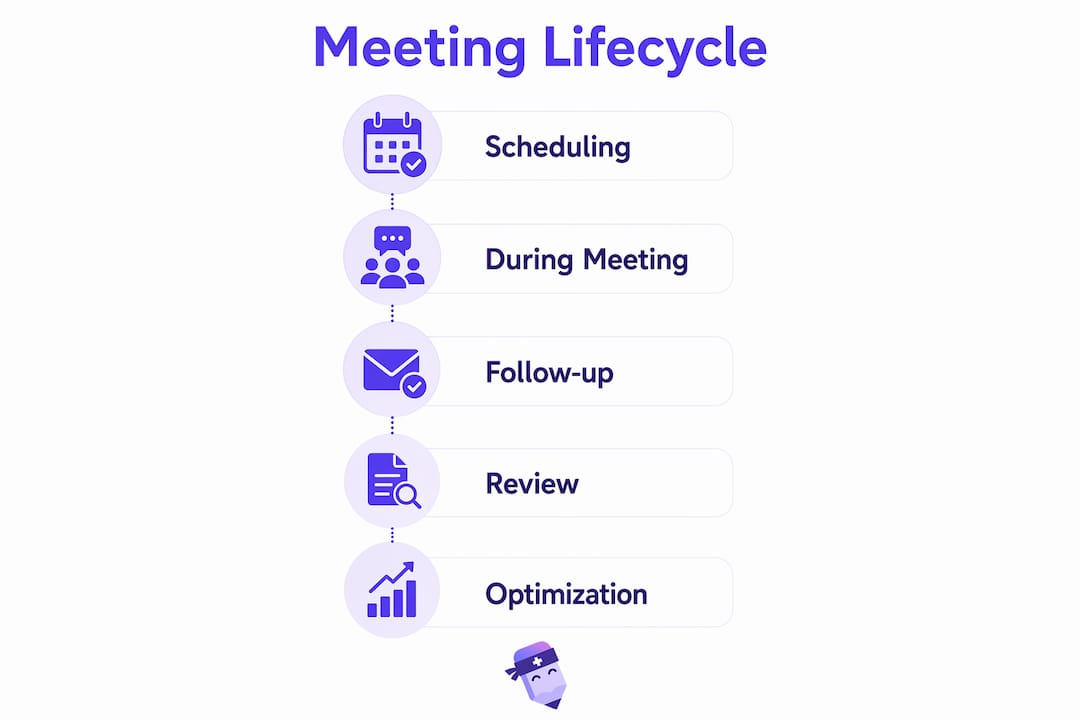
Meeting management applications improve efficiency at every stage of the meeting lifecycle, not just during the meeting itself. The gains show up in four specific areas that matter most to ministry teams.
-
Scheduling without the back-and-forth. Automated calendar syncing eliminates the email chains that consume admin time before a meeting even starts. Smart scheduling tools surface available times across multiple calendars and send invites automatically.
-
Focused discussions with structured agendas. Meeting management software automates agenda setup and time tracking, keeping discussions on topic. When a church staff meeting has a visible agenda and a timer, conversations stay productive.
-
Clear ownership assigned in the room. Action items get names and deadlines attached before the meeting ends. No one leaves wondering who was supposed to follow up with the facilities team or the guest speaker.
-
Automated distribution of minutes and reminders. Platforms automatically distribute notes and action items immediately after meetings. Your team receives a summary before they have even left the parking lot.
The cumulative effect is significant. Meeting productivity software transforms meetings into high-performance execution systems where leaders spend less time on logistics and more time on mission. For a pastor who runs five or six meetings per week, that shift changes how the entire week feels. You can learn more about running efficient church staff meetings to see these principles applied directly to ministry contexts.
Pro Tip: Review your meeting summaries every Friday morning. Patterns in unresolved action items reveal where your team needs clearer processes, not more meetings.
What are best practices for selecting meeting productivity tools in ministry?
The biggest mistake ministry leaders make is adopting too many tools at once. Tool bloat is a major killer of meeting productivity. When your team uses one app for scheduling, a different one for video, a third for notes, and a fourth for tasks, the friction between tools cancels out the benefit of each.
The better approach follows a simple principle: one strong tool per meeting lifecycle stage reduces complexity and keeps your team focused. Here is how to apply that principle in a ministry setting:
- Map your meeting lifecycle first. Identify the four stages: scheduling, running the meeting, capturing outputs, and following up. Then select one tool that handles each stage well.
- Align software adoption with clear agenda structures. Software does not fix a poorly structured meeting. Define your agenda format before you configure any tool.
- Assign accountability owners before you go live. Every meeting type needs a named person responsible for reviewing AI summaries and confirming action items. Without that owner, automation produces records that no one acts on.
- Configure AI assistants for decision-critical meetings only. Configuring AI assistants to participate only in decision-critical meetings avoids participant fatigue and privacy concerns. Not every staff check-in needs a bot in the room.
- Integrate outputs with your task management workflow. Meeting summaries lose relevance within 72 hours if they are not connected to a task or project system. Build that connection on day one.
The deeper lesson here is that process change drives results, not technology alone. Successful adoption depends on clear agendas and accountability owners, not just the software itself. A church that installs a meeting tool without changing how it runs meetings will see modest gains at best. Read more about church admin workflow automation to understand how process and technology work together.
What does a typical meeting lifecycle look like with software support?
A well-supported meeting lifecycle has three distinct phases, and software plays a specific role in each one.
| Phase | What software does | Ministry example |
|---|---|---|
| Before the meeting | Syncs calendars, sends agenda, confirms attendees | Elder board invite with pre-loaded discussion points |
| During the meeting | Captures audio, transcribes in real time, tracks agenda timing | AI note-taker records pastoral planning session |
| After the meeting | Generates summary, assigns action items, sends reminders | Volunteer coordinator receives task list within minutes |
The before phase is where most ministry teams lose the most time. Scheduling a meeting across a pastor, two elders, and a ministry director can take a dozen emails. Automated scheduling tools cut that to one confirmation message.
The during phase is where AI transcription earns its place. A church administrator who used to type notes while trying to follow the conversation can now be fully present. The software handles the record. The human handles the relationship.
The after phase is the most underrated. Automation frees teams from manual note-taking and follow-up management, but only if the outputs connect to where work actually happens. If your team tracks tasks in a project management app, your meeting software needs to push action items there automatically. Phased adoption works best: start with AI note-taking in one meeting type, confirm the workflow, then expand to other meeting formats. Readypen is built specifically for this kind of phased, ministry-focused rollout.
Key Takeaways
Meeting productivity software delivers its greatest value when AI-driven documentation connects directly to task workflows, giving ministry leaders clear records and named accountability without extra administrative work.
| Point | Details |
|---|---|
| Core definition | Meeting productivity software integrates scheduling, AI transcription, and task tracking into one connected workflow. |
| Time savings | Teams report saving more than 8 hours per week in administrative work when using these tools consistently. |
| Avoid tool bloat | Use one strong tool per meeting lifecycle stage to reduce complexity and keep your team focused. |
| Process first | Software adoption without clear agendas and accountability owners produces records, not results. |
| Integration matters | Meeting summaries lose relevance within 72 hours if they are not connected to a task management system. |
Why process beats technology every time in ministry meetings
Church meetings carry weight that corporate meetings do not. Decisions made in an elder board session affect real people, real families, and real faith communities. That weight makes it tempting to reach for technology as a fix when meetings feel unproductive. I have seen ministry teams install three new apps in a month and still leave every meeting with no clear next steps.
The tools are not the problem. The process is. When I look at ministry teams that actually improved their meetings, the pattern is consistent. They defined what a good meeting outcome looked like before they picked any software. They assigned one person to own the post-meeting summary. They used AI note-taking in their most important meetings first, confirmed it worked, and then expanded.
The technology accelerates a good process. It does not create one. A church that runs unfocused, agenda-free meetings will get unfocused, agenda-free AI summaries. The software just makes the dysfunction faster and more documented.
What I find most encouraging is that ministry leaders are often better positioned than corporate managers to make this shift. You already operate with a sense of mission and shared purpose. Aligning your meeting process with that mission is not a management exercise. It is a stewardship decision. When your team spends less time on administrative friction and more time on the work you were called to do, that is a meaningful outcome. The right tools, used with the right process, make that possible.
— Robbie
Readypen brings AI meeting documentation to your church
Church staff teams run more meetings than most organizations, and fewer of them have a dedicated note-taker in the room. Readypen is built specifically for that gap.
Readypen automatically generates meeting minutes and summaries from your conversations and recordings, so your team walks away with a structured record every time. Action items are captured, decisions are documented, and your pastor does not have to reconstruct the meeting from memory on Thursday morning. Readypen connects AI transcription with follow-up tracking in a format designed for ministry leaders, not corporate IT departments. If your church is ready to spend less time on documentation and more time on mission, Readypen is worth a close look.
FAQ
What is meeting productivity software?
Meeting productivity software is an integrated set of tools that automates scheduling, captures meeting discussions with AI transcription, and tracks action items to improve meeting outcomes. It differs from basic video or calendar tools by connecting documentation directly to task management workflows.
How does meeting productivity software help church administrators?
Church administrators use these tools to automate meeting minutes, assign action items during the meeting, and distribute summaries automatically after it ends. Teams report saving more than 8 hours per week in administrative work when these tools are used consistently.
What features should ministry leaders look for in meeting software?
The most important features are AI transcription, automated action item tracking, calendar integration, and direct connection to a task management platform. Without that last feature, meeting summaries lose their value within 72 hours.
How do you avoid tool overload when adopting meeting software?
Select one strong tool for each stage of the meeting lifecycle: scheduling, running the meeting, capturing outputs, and following up. Using multiple overlapping apps creates friction that cancels out the efficiency gains.
Does AI meeting software work for small church teams?
AI meeting tools work well for small teams because they reduce the need for a dedicated note-taker. Even a two-person pastoral planning session benefits from an automated summary and a clear list of next steps.