How to Track Church Project Meeting Progress

How to Track Church Project Meeting Progress
Tracking church project meeting progress means systematically monitoring tasks, deadlines, and communication flow so every project stays on course and every stakeholder stays informed. Church leaders run a high volume of meetings with limited admin support, which makes informal tracking a real liability. Without a structured system, decisions get lost, milestones slip, and congregation trust erodes. The good news is that the right combination of digital tools, visual workflows, and consistent review habits solves all three problems at once.
How to track church project meeting progress effectively
Project progress tracking, the recognized practice in project management, refers to the ongoing measurement of task completion against a defined plan. For church leaders, this means more than checking boxes. It means connecting meeting outcomes to real project movement and communicating that movement to staff, volunteers, and donors.
Integrated donor and project systems function as digital command centers, increasing giving by 20% through transparency and timely follow-up. That number reflects something deeper: when people can see progress, they invest in it. The same principle applies inside your leadership team. Visible progress drives accountability.

Three prerequisites make any tracking system work. First, define roles clearly so every task has one owner. Second, set measurable KPIs for each project phase, such as “Phase 1 complete by March 15” rather than “finish soon.” Third, schedule recurring reviews before the project starts, not after things go sideways.
What tools do church leaders need for meeting progress tracking?
The right tools depend on your project size and team structure. Most church teams benefit from three categories of software working together.
| Feature category | What it does | Why it matters for churches |
|---|---|---|
| Visual workflow boards | Shows task status from planning to completion | Keeps volunteers and staff aligned without extra meetings |
| Calendar synchronizers | Connects meeting schedules to project timelines | Reduces scheduling conflicts and missed reviews |
| Donor and project platforms | Tracks giving, milestones, and communication in one place | Builds donor confidence through real-time visibility |
| Automated documentation | Generates meeting notes and summaries automatically | Saves hours of manual note-taking per week |
A digital command center with centralized dashboards prevents the loss of critical information dispersed across emails and texts. This is the single most common failure point for church projects. When updates live in three different group chats and two email threads, no one has the full picture.
Pro Tip: Before selecting any tool, map out who needs to see what. A pastor needs a high-level status view. A project lead needs task-level detail. Choose a platform that serves both without requiring two separate systems.
Specialized church meeting scheduling apps reduce planning time from hours to minutes and cut no-shows below 10%. Fewer missed meetings means fewer gaps in your project timeline. That alone justifies the time spent setting up a proper scheduling system.
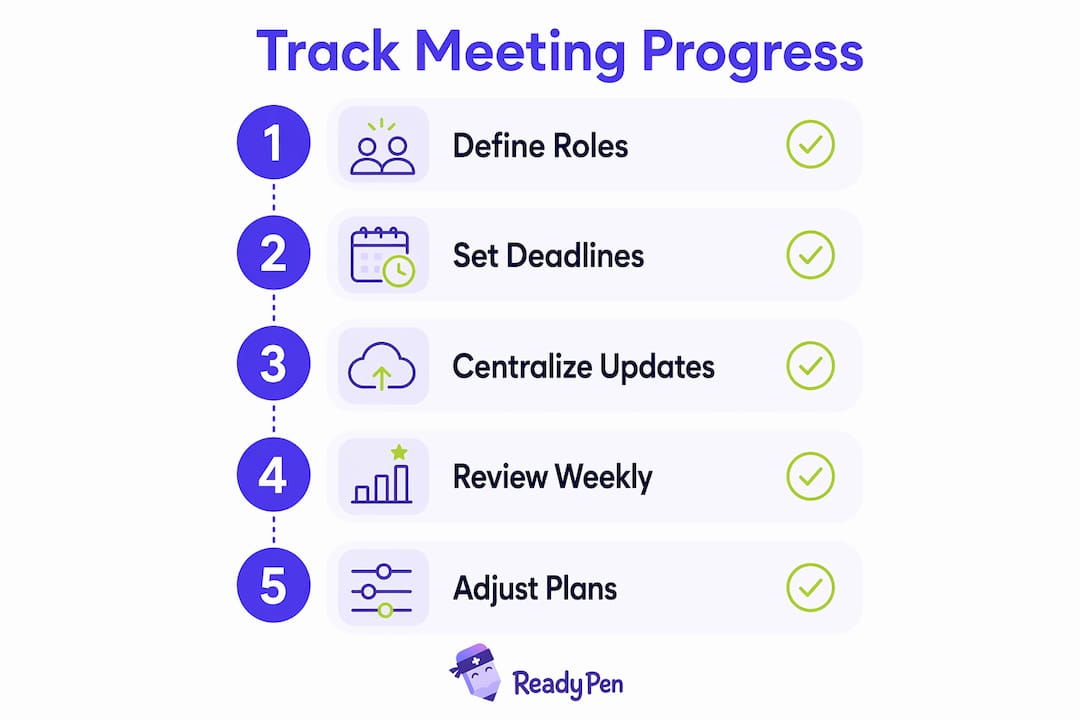
Step-by-step methods to document and monitor church project updates
A repeatable process is what separates churches that finish projects from those that stall halfway through. The following sequence works for building campaigns, ministry launches, and community outreach programs alike.
-
Break the project into phases. Define three to five phases with a clear deliverable at the end of each. A building campaign might use: Planning, Funding, Construction, Completion, and Dedication. Each phase becomes a column on your visual board.
-
Build a Kanban-style visual board. Breaking large projects into transparent phases with visual progress milestones builds momentum and donor trust. Assign each task a card. Move cards across columns as work progresses. Every team member sees the same board.
-
Assign one owner per task. Shared ownership means no ownership. Every card on the board carries one name. That person updates the status before each review meeting.
-
Document every meeting immediately. Meeting minutes are the paper trail that proves progress happened. Use a church board meeting template to standardize what gets recorded: decisions made, tasks assigned, deadlines set, and next steps.
-
Send a brief status update after each meeting. A three-sentence summary sent to all stakeholders within 24 hours keeps everyone aligned. It does not need to be formal. It needs to be accurate and timely.
-
Review the board weekly. A five-minute board review at the start of each staff meeting catches stalled tasks before they become crises. Without this habit, your visual board becomes outdated within two weeks.
Pro Tip: Automate your meeting documentation with an AI tool like Readypen. It generates structured notes and summaries directly from your meeting recordings, so your board stays current without anyone spending an hour typing up minutes.
For church leaders who want to go deeper on meeting workflow automation, the payoff is significant. Automated documentation removes the bottleneck between “meeting happened” and “team knows what was decided.”
What are the most common mistakes in monitoring church project updates?
Most church project tracking failures share the same root cause: the system works at launch and then quietly falls apart. Recognizing the warning signs early saves projects.
Common mistakes to avoid:
- Fragmented tools. Using email for some updates, a group chat for others, and a spreadsheet for tasks creates three sources of truth. None of them are reliable.
- Skipping the weekly review. Without weekly 5–10 minute reviews, Kanban boards become data graveyards. A board no one updates is worse than no board at all.
- No single task owner. When two people share a task, both assume the other is handling it.
- Irregular stakeholder updates. Donors and congregation members who stop hearing about a project assume it stalled. Silence reads as failure.
- Treating documentation as optional. Verbal decisions made in meetings disappear. Written records do not.
Transparency in tracking not only aids leaders but also serves as trust-building for the broader congregation, encouraging ongoing reporting and participation. When people can see updates moving from “Reported” to “Complete,” that visibility drives continued engagement from both staff and volunteers.
The fix for most of these problems is a unified dashboard combined with a non-negotiable weekly review. Visible ticket status increases trust and continued reporting from congregation and staff. That trust is hard to rebuild once lost, so protecting it through consistent communication is worth the effort.
For a deeper look at how communication systems support project tracking, the guide on church staff communication covers practical coordination approaches that work for teams of all sizes.
How do you evaluate church project milestones and adjust plans?
Evaluating milestones means comparing what was planned against what actually happened, then deciding what to do next. This is where most church leaders feel least confident, because adjusting a plan can feel like admitting failure. It is not. It is the work.
| Milestone status | What it signals | Recommended action |
|---|---|---|
| On track | Tasks complete, timeline holding | Communicate progress to donors and staff |
| Slightly behind | One or two tasks delayed | Reassign resources, update timeline, notify stakeholders |
| Significantly behind | Phase deadline missed | Conduct a root cause review, reset milestones, send a transparent update |
| Stalled | No movement for two or more weeks | Escalate to leadership, identify blockers, consider scope adjustment |
Tracking contributions and donor engagement regularly during campaigns spurs more giving and keeps momentum. Visual tools like progress bars and fund-raised-versus-goal charts give donors a concrete reason to stay engaged. A thermometer graphic on a church website showing 68% of a building fund raised communicates more than any newsletter paragraph.
When a milestone slips, the worst response is silence. Send a brief, honest update to your stakeholders. Explain what happened, what the new timeline looks like, and what specific steps are underway. Congregations and donors respond well to honesty. They respond poorly to discovering problems on their own.
Pro Tip: Schedule a formal milestone review at the end of each project phase, not just at the end of the project. A 30-minute review meeting with your core team after each phase catches course corrections early, when they are still manageable.
For church leaders working on workflow optimization, milestone reviews are the single highest-leverage habit to build. They turn a passive tracking system into an active management tool.
Key Takeaways
Effective church project tracking requires a centralized system, defined ownership, visual milestones, and a consistent weekly review cadence to keep projects moving and stakeholders confident.
| Point | Details |
|---|---|
| Centralize all updates | Use one digital dashboard so no information gets lost across emails and texts. |
| Assign single task owners | Every task needs one named person responsible for its completion and status updates. |
| Review the board weekly | A 5–10 minute weekly review keeps your visual board accurate and your team aligned. |
| Communicate milestone progress visually | Progress bars and phase updates build donor trust and sustain congregation engagement. |
| Document every meeting immediately | Written records of decisions and next steps prevent miscommunication and lost commitments. |
What I’ve learned about church project tracking after years of watching it fail
The most common thing I see is a church that launches a beautiful project board in January and abandons it by March. Not because the leaders are disorganized. Because no one built the review habit into the weekly rhythm.
The five-minute board review is the most underrated practice in church project management. It feels too short to matter. But a five-minute check every week compounds into a project that stays current, a team that stays accountable, and a congregation that stays informed. Skip it for three weeks and you are starting over.
The second thing I have learned is that transparency is not just a communication strategy. It is a trust strategy. When your congregation can see a project moving from phase to phase, they feel like participants, not spectators. That shift in perception changes how they give, how they volunteer, and how they talk about the church to others.
Digital tools changed everything for me personally. Before AI-assisted documentation, someone had to spend an hour after every meeting typing up notes. Half the time, that person was the pastor. Now that work happens automatically, and the notes are structured, searchable, and ready to share. That is not a small thing. That is hours returned to ministry every single week.
My honest advice: pick one system, commit to it for 90 days, and do not switch until you have given it a real chance. The tool matters less than the habit.
— Robbie
Readypen makes church meeting documentation automatic
Church leaders who want to track project meeting progress without drowning in paperwork have a direct solution in Readypen. Readypen is an AI-powered meeting documentation tool built specifically for churches, pastors, and ministry teams.
Readypen automatically generates structured meeting notes, summaries, and task lists from your conversations or recordings. That means your project board stays current after every meeting without anyone spending time on manual write-ups. For ministry leaders managing building campaigns, outreach programs, or board governance, Readypen connects meeting documentation for ministry directly to your project tracking workflow. Your team spends less time on paperwork and more time on the work that matters.
FAQ
What does tracking church project meeting progress mean?
Tracking church project meeting progress means systematically monitoring task completion, deadlines, and communication outcomes from each meeting to keep projects on schedule and stakeholders informed.
How often should church leaders review project status?
A weekly 5–10 minute board review is the minimum effective cadence. Without it, visual project boards quickly become outdated and unreliable.
What is the best way to document church meeting decisions?
Use a structured template that captures decisions made, tasks assigned, owners named, and deadlines set. AI tools like Readypen automate this process directly from meeting recordings.
How do visual milestones help church project communication?
Visual tools like progress bars and phased status boards give donors and congregation members a clear, immediate picture of where a project stands, which builds trust and sustains engagement.
Why do church projects stall even with a tracking system in place?
Projects stall when no one owns the weekly review habit. A tracking system without a consistent update cadence becomes inaccurate within weeks, and inaccurate data leads to poor decisions.
Recommended
- ReadyPen - AI Meeting Documentation for Churches | Automated Minutes & Summaries
- ReadyPen - AI Meeting Documentation for Churches | Automated Minutes & Summaries
- ReadyPen - AI Meeting Documentation for Churches | Automated Minutes & Summaries
- ReadyPen - AI Meeting Documentation for Churches | Automated Minutes & Summaries