Documentation Efficiency for Church Staff: A Clear Guide

Documentation Efficiency for Church Staff: A Clear Guide
Documentation efficiency is defined as the practice of creating, managing, and retrieving documents with the least amount of time, effort, and error possible. For church staff and ministry leaders, this definition matters because administrative work competes directly with mission work. AI-assisted documentation can reduce administrative time by up to 40%, freeing pastors and church admins to focus on people rather than paperwork. Understanding what does documentation efficiency mean is the first step toward building workflows that actually serve your team.
What does documentation efficiency mean for ministry teams?
Documentation efficiency is not just about typing faster. The formal concept, sometimes called documentation effectiveness in process management literature, refers to how well your documentation workflows produce accurate, usable records without wasting staff time or creating confusion downstream.
Three conditions define an efficient documentation process. First, the right information gets captured at the right time. Second, that information is stored in a format anyone on the team can find and use quickly. Third, the process itself takes as little effort as possible to repeat meeting after meeting.

For a church admin managing board meetings, elder sessions, and volunteer coordination, those three conditions translate directly into fewer late nights and fewer “wait, what did we decide?” moments. Documentation’s main purpose is future-oriented communication that supports team action, not just a record of what happened. That reframe matters. You are not writing history. You are writing instructions for your future team.
What are the pillars of documentation efficiency and how do they work?
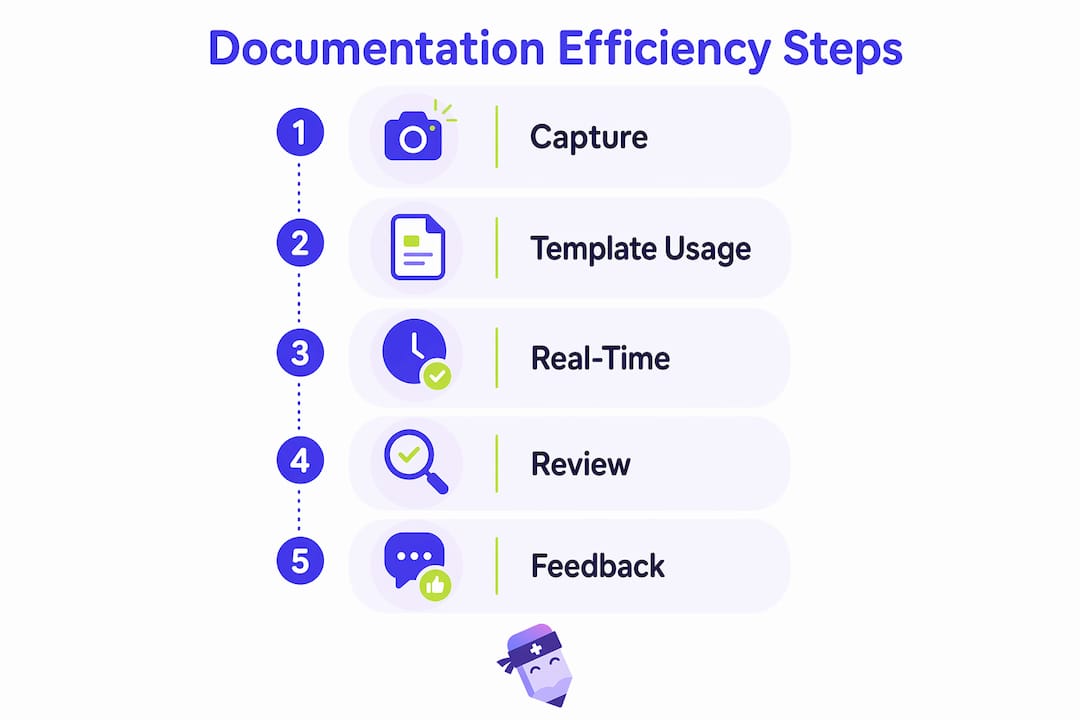
Four core pillars drive efficient documentation in any organization. Ministry teams benefit from understanding each one concretely.
- Standardized templates. A consistent format for meeting minutes, pastoral care notes, or budget reviews removes the guesswork of “what should I include?” every time. Standardized templates and terminology reduce follow-up clarifications and speed up task completion across the team.
- Real-time capture. Writing notes during a meeting is far more accurate than reconstructing them two hours later. Real-time capture reduces cognitive load and errors compared to retrospective note-taking. For a pastor running three meetings in one day, this difference is significant.
- Regular audits. Reviewing your documentation process every quarter reveals gaps before they become habits. Organizations with regular documentation audits resolve workflow gaps 30% faster than those without structured review cycles.
- Purpose-driven scope. Capture only what your team will actually use. The 80/20 principle applies directly here: focus on the 20% of information that drives 80% of decisions, and leave the rest out.
Pro Tip: Build a single shared template library for your most common meeting types, such as board meetings, staff check-ins, and volunteer briefings. Standardizing just three templates can cut your documentation prep time in half.
These pillars work together. A great template used inconsistently still produces confusion. Real-time capture without a standard format produces noise. All four pillars need to be present for documentation quality to hold up across your whole ministry team.
How does documentation efficiency reduce burnout and improve productivity?
Church staff rarely have dedicated administrative support. The pastor takes notes, the elder summarizes decisions, and the volunteer coordinator follows up on action items, often all in the same meeting. That workload adds up fast.
“Documentation efficiency removes repetitive manual entries so tasks can be closed immediately, preventing backlog and burnout.” This is not a productivity theory. It is what happens when friction disappears from a workflow.
Over 22% of professionals spend more than 8 hours weekly on after-hours administrative paperwork. That is a full extra workday every week spent on documentation alone. For ministry staff who are already stretched across pastoral care, program planning, and community outreach, that number represents real burnout risk.
The productivity gain from efficient documentation is not just about time saved. It is about mental energy recovered. When your church admin is not spending Sunday evening reconstructing Friday’s meeting notes from memory, they show up Monday with more capacity for the work that actually requires human judgment. Removing friction from documentation prevents work backlogs and keeps ministry teams moving forward rather than catching up.
Repetitive manual data entry is one of the fastest paths to staff disengagement. When the same information gets typed into three different places every week, the task stops feeling meaningful. Reducing that repetition through templates, automation, or AI-assisted tools restores a sense of purpose to administrative work.
Common pitfalls in achieving documentation efficiency
Improving documentation is not as simple as buying a new tool or downloading a template. Several common mistakes slow ministry teams down even when they are trying to get better.
- The “more is better” trap. Thorough documentation feels responsible. But over-documenting irrelevant information creates clutter that slows retrieval and buries the decisions that actually matter. A 10-page meeting summary that nobody reads is less efficient than a one-page summary that drives action.
- Skipping human review of AI-generated notes. AI tools produce fast, structured output. But AI-powered documentation requires human verification to avoid errors. A quick two-minute review of an AI-generated summary catches the misattributed quote or the missed action item before it causes a problem.
- Inconsistent terminology across your team. When one person calls it a “ministry team update” and another calls it a “staff check-in,” the same type of meeting produces documents that are hard to search and compare. Agreed-upon labels and formats are not bureaucracy. They are the foundation of findable records.
- Treating technology as the complete solution. A new documentation tool only works if your team trusts it and knows how to use it. Training and buy-in matter as much as the software itself.
Pro Tip: Run a 15-minute documentation audit at the end of each quarter. Pull three recent meeting records and ask: Could a new team member understand what was decided and what to do next? If not, your template needs a revision.
The nuance worth noting is that documentation process improvement is a culture shift, not a one-time fix. The teams that sustain efficiency gains are the ones that build review cycles into their calendar and treat documentation standards as living agreements, not static rules.
Practical steps to improve documentation for church staff
Improving documentation effectiveness does not require an IT department or a large budget. These steps apply directly to church admins, pastors, and ministry leaders working with small teams.
Start with your most frequent meeting type. Identify the meeting your team holds most often, whether that is a weekly staff meeting, a monthly board session, or a regular elder gathering. Build one clear template for that meeting using a structure like: attendees, agenda items, decisions made, and action items with owners and deadlines. A church board meeting template gives you a ready-made starting point.
Use AI-assisted tools for note capture. Tools that generate structured summaries from recorded conversations remove the burden of manual transcription entirely. Tailored templates, mobile tools, and AI assistance reduce after-hours work while maintaining full contextual accuracy. For ministry teams running back-to-back meetings, this is a practical way to reclaim hours every week.
Assign documentation roles clearly. Ambiguity about who takes notes is one of the most common causes of missing records. Deciding in advance who should take meeting minutes removes that ambiguity and sets a clear expectation before the meeting starts.
Build a feedback loop. After each quarter, ask your team two questions: What information from our meetings was hardest to find later? What did we document that we never actually used? Those two questions will tell you exactly where to tighten your process.
| Approach | Best for |
|---|---|
| Standardized templates | Teams with recurring meeting types needing consistent records |
| AI-assisted note capture | Leaders running multiple meetings with no dedicated admin support |
| Real-time mobile capture | Field-based ministry teams documenting pastoral visits or outreach events |
| Quarterly documentation audits | Teams wanting to measure and improve documentation quality over time |
The goal is not a perfect system on day one. The goal is a process that gets slightly better each quarter because your team is paying attention to it.
Key Takeaways
Documentation efficiency is the single most practical way church staff can recover time, reduce burnout, and keep their team aligned without adding headcount.
| Point | Details |
|---|---|
| Definition of documentation efficiency | It means capturing the right information, in the right format, with the least effort possible. |
| Standardization drives speed | Shared templates and consistent terminology cut follow-up time and reduce confusion across teams. |
| Real-time capture beats retrospective notes | Writing notes during meetings reduces errors and cognitive load compared to reconstructing them later. |
| AI tools need human review | AI-generated summaries save time but require a quick human check to catch errors before they spread. |
| Audits close the gap | Quarterly reviews of your documentation process identify what is working and what needs fixing. |
Why documentation friction is the real enemy in ministry
The conversation about documentation in churches almost always focuses on the wrong thing. Teams debate which app to use or which template looks best. The real problem is friction. Friction is what happens when a pastor finishes a meeting and still has 45 minutes of paperwork ahead of them before they can go home.
I have seen ministry teams with excellent intentions and terrible documentation habits. They care deeply about accuracy. They just have no system. Every meeting produces a different format, stored in a different place, owned by whoever happened to be sitting closest to the laptop. That is not a technology problem. It is a culture problem.
The fix is not complicated, but it does require a decision. Someone has to own the documentation standard. Someone has to say, “This is how we record our meetings, and we are going to use this format every time.” That decision, made once and reinforced consistently, does more for documentation effectiveness than any tool on the market.
What I find most encouraging about AI-assisted documentation is that it lowers the cost of that decision. When a tool can generate a structured summary automatically, the barrier to consistent documentation drops significantly. Your team does not have to choose between a good meeting and good notes. They can have both.
The ministry teams that get this right are not the ones with the biggest budgets. They are the ones that treat documentation as a form of care for their future selves and their colleagues.
— Robbie
How Readypen helps church teams document meetings without the extra work
Church staff run a lot of meetings. Most of them do not have a dedicated admin to document everything. Readypen is built specifically for that gap.
Readypen automatically generates structured meeting summaries from conversations or recordings, so your team walks out of every meeting with accurate notes already drafted. No more late-night transcription. No more missing action items. Ministry leaders using Readypen report spending far less time on after-meeting paperwork, which means more time for the work that actually requires their presence. If you want to see what well-documented church meetings look like in practice, the church meeting minutes guide is a strong place to start.
FAQ
What does documentation efficiency mean in simple terms?
Documentation efficiency means creating and managing records with the least time and effort while keeping them accurate and useful. For church staff, it means spending less time on paperwork and more time on ministry.
How does documentation efficiency reduce staff burnout?
Over 22% of professionals spend more than 8 hours weekly on after-hours documentation. Reducing that load through templates, real-time capture, and AI tools directly lowers the administrative burden that drives burnout.
What is the difference between documentation efficiency and documentation quality?
Efficiency refers to how fast and easily documents are created and retrieved. Quality refers to how accurate and useful those documents are. The best documentation processes deliver both at the same time.
Do AI tools replace the need for human review of meeting notes?
No. AI-generated notes require a quick human review to catch errors, misattributions, or missing context. The most effective workflows combine AI speed with human oversight.
How often should a church team audit its documentation process?
A quarterly review is the right frequency for most ministry teams. Pull three recent meeting records, check whether decisions and action items are clear, and adjust your template if they are not.