Church Admin Time Management Strategies That Save Hours Weekly

Church Admin Time Management Strategies That Save Hours Weekly
Church admin time management strategies are the structured methods church administrators use to protect focused work time, reduce task overload, and keep ministry operations running without burning out their staff. Targeted process fixes like batching communications and using templates can reclaim 8–15 hours of work time weekly for church admins. That is not a marginal gain. It is the difference between a team that serves the congregation and one that spends every week just catching up. This guide covers the core strategies, the right tools, and the exact steps to put them in place.
What are the essential church admin time management strategies?
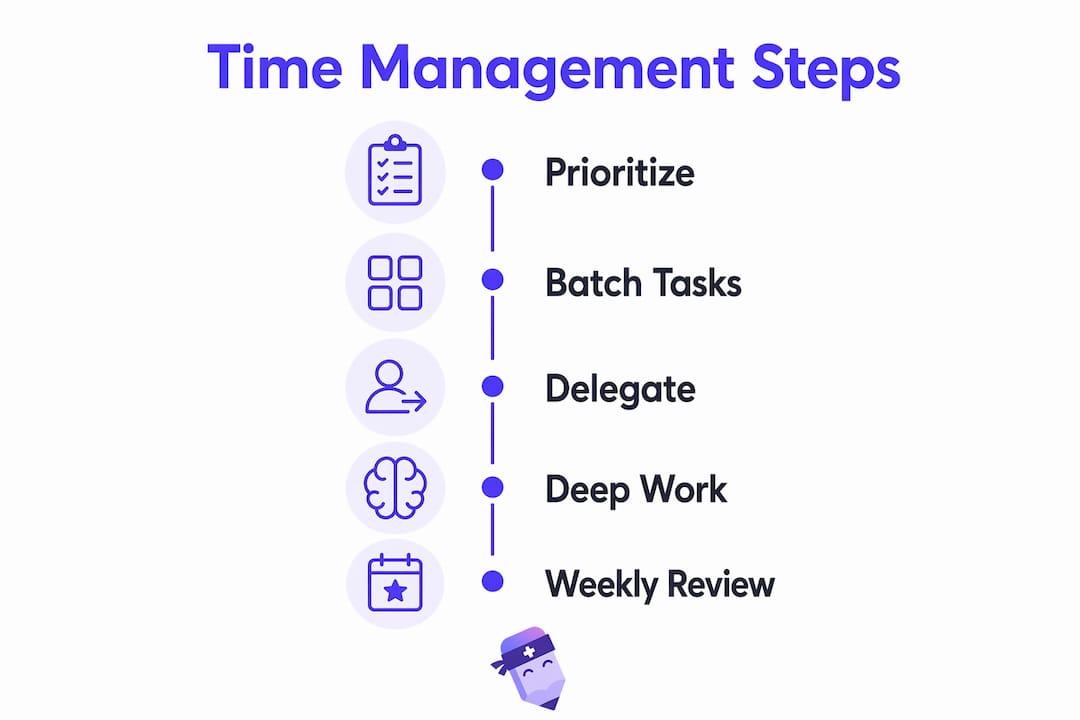
The four strategies that deliver the most consistent results are prioritization, task batching, delegation, and deep work blocks. Each one addresses a specific way that church admin time gets fragmented throughout the week.
Prioritization by ministry impact means sorting tasks by what directly serves people versus what is purely administrative maintenance. A follow-up call to a grieving family member ranks above reformatting a bulletin. When admins start each day by identifying their top three ministry-critical tasks, lower-priority work stops crowding out what matters most.

Task batching groups similar work into dedicated time windows. Instead of answering emails as they arrive throughout the day, you process all email in two 30-minute windows, once in the morning and once in the afternoon. The same logic applies to phone calls, data entry, and social media posts. Batching cuts the mental cost of switching between unrelated tasks, which is one of the biggest hidden drains on admin productivity.
Delegation is where many church admins stall. The instinct is to handle everything personally because no one else knows the process. The fix is documentation. Write a one-page standard operating procedure for any task you repeat more than twice a month, then hand it off to a trained volunteer or part-time staff member.
- Identify tasks only you can do versus tasks anyone trained could do
- Write a one-page SOP for each repeatable task before delegating it
- Assign ownership clearly so volunteers know exactly what they are responsible for
- Review delegated tasks weekly, not daily, to avoid micromanaging
Deep work blocks are non-negotiable calendar holds of 60–90 minutes where you do focused, high-concentration work with no interruptions. Church admins who protect even two deep work blocks per day report finishing complex projects in half the time. Block these slots first, then schedule meetings around them.
Pro Tip: Set your office communication status to “unavailable” during deep work blocks and communicate this policy to your team in advance. Consistency trains your colleagues to respect the boundary.
Weekly review sessions where you assess completed tasks and upcoming priorities reduce overlooked duties and keep the week from running you instead of the other way around.
How can technology and AI tools transform church admin work?
AI tools are the fastest path to recovering hours that currently disappear into repetitive, low-value tasks. The key is incremental adoption, not a full system overhaul on day one.
Investing about 2 hours in AI workflow training enables automating 3–4 routine administrative tasks, with time savings often visible by day 3. That is a return on investment most productivity tools cannot match. The practical starting points for church admins are email drafting, meeting summaries, and report generation.
Here is a step-by-step approach to AI adoption that avoids the abandonment problem:
- Pick one task. Choose the single most repetitive admin task you do each week, such as drafting volunteer reminder emails.
- Train on that task only. Spend 60–90 minutes learning how your chosen AI tool handles that specific task. Do not try to learn everything at once.
- Run it for one week. Use the AI tool exclusively for that task for seven days and measure the time saved.
- Add one task per week. Once the first task feels automatic, add a second. Gradual AI adoption prevents the abandonment that happens when teams try to overhaul everything at once.
- Document your prompts. Save the prompts and instructions that produce good results so any team member can replicate them.
Practical AI applications for church admins include drafting pastoral care follow-up emails, generating first drafts of newsletters, summarizing board meeting recordings, and creating volunteer onboarding checklists. Tools like ChatGPT and Google Gemini handle all of these tasks well with minimal setup.
Pro Tip: Create a shared document called “Prompt Library” where your team saves the exact AI prompts that work best for recurring church communications. This turns individual knowledge into a team asset.
Automated meeting documentation tools reduce the manual note-taking burden and speed task completion for church staff. When meeting minutes write themselves, the admin who used to spend 45 minutes transcribing notes can redirect that time to higher-value work.
Why do theme days work so well for church scheduling?
Theme days assign each weekday a specific category of work, so your brain stays in one mode instead of jumping between planning, communications, pastoral care, and finances all in the same morning. Adopting theme days reduces staff burnout by 45% by focusing work efforts on specific task categories each day. That number reflects a real cognitive benefit: sustained focus on one type of work is less exhausting than constant context switching.
A practical theme day structure for a church admin might look like this:
- Monday: Administrative tasks, inbox processing, and data entry
- Tuesday: Communications, newsletters, and social media scheduling
- Wednesday: Meetings, pastoral coordination, and staff check-ins
- Thursday: Event planning, volunteer coordination, and logistics
- Friday: Weekly review, SOP updates, and preparation for the following week
The structure above is a starting point, not a rigid prescription. Adjust it to match your church’s natural rhythm.
Calendar tools and booking links can enforce theme day boundaries by blocking off focus time and routing meeting requests to designated slots. Google Calendar, Calendly, and similar tools all support this approach. When your calendar reflects your theme day structure, outside requests automatically land in the right windows.
“The church admin’s role is fundamentally ministerial. Operational systems serve the staff, enabling ministry focus.” — Church Admins Are Drowning
Theme days also protect staff wellness in a way that general productivity advice misses. When a church admin knows that Wednesday is for meetings and Monday is for focused admin work, they stop dreading the week. Predictability reduces anxiety.
How does volunteer scheduling reduce admin time?
Manual volunteer scheduling through group chats and spreadsheets is one of the most consistent time traps in church administration. The admin ends up as a full-time coordinator, chasing confirmations and filling last-minute gaps every single week.
Digital tools like SignUpGenius and Planning Center Online shift that burden to the volunteers themselves. Scheduling volunteers 6–8 weeks in advance with automated reminders drops no-shows dramatically. The admin moves from being the scheduler to being the exception manager, which is a much smaller job.
| Approach | Admin time per week | No-show rate | Volunteer experience |
|---|---|---|---|
| Manual group chat scheduling | 3–5 hours | High | Confusing |
| Spreadsheet with manual follow-up | 2–3 hours | Moderate | Inconsistent |
| Digital self-scheduling (SignUpGenius, Planning Center) | 30–45 minutes | Low | Clear and predictable |
The difference in the table above is not subtle. Moving from manual scheduling to a digital self-scheduling system can return 2–4 hours to an admin’s week immediately.
Automated onboarding is the next step. When a new volunteer signs up, they should receive a welcome email, a role description, and a schedule confirmation automatically. No admin action required. Tools like Planning Center Online support automated onboarding sequences out of the box.
Pro Tip: Build your volunteer schedule template 8 weeks out at the start of each quarter. Fill recurring roles first, then open remaining slots for self-selection. This cuts your weekly scheduling work to exception handling only.
How do you audit your admin systems for lasting efficiency?
Switching between 8 or more disconnected tools is the biggest time sink most church admins do not recognize as a problem. Every tool switch costs mental energy and time. Consolidating into fewer, better-integrated systems is the highest-leverage admin organization move a church can make.
A practical audit follows these steps:
- List every tool you use. Write down every app, platform, spreadsheet, and communication channel your team touches in a typical week.
- Identify overlaps. Find tools that serve the same purpose. Two contact databases, three communication channels, and two calendar systems are common findings.
- Pick one source of truth per category. Choose one contact database, one calendar, one communication platform, and one task manager. Migrate everything else into those systems.
- Set up a shared password manager. Tools like 1Password or Bitwarden eliminate the time lost to password resets and access requests. This alone saves hours per month across a team.
- Run a monthly data cleaning session. Dedicate 30 minutes each month to removing duplicate contacts, archiving old files, and updating SOPs. Small maintenance prevents large crises.
The annual audit is the most overlooked practice in church admin organization. Once per year, review every system, every tool subscription, and every recurring task. Ask whether each one still serves the ministry or just persists out of habit.
| Audit area | Action | Frequency |
|---|---|---|
| Tool inventory | List and consolidate overlapping tools | Annual |
| Contact database | Remove duplicates, update records | Monthly |
| SOP library | Review and update procedures | Quarterly |
| Subscriptions | Cancel unused tools | Annual |
Administrative stall often comes from manual processes. Integrated technology frees staff to focus on people, not paperwork. The audit is how you find where the manual processes are hiding.
Key Takeaways
Church admins who batch tasks, adopt AI tools incrementally, and consolidate their systems can reclaim 8–15 hours per week while reducing staff burnout by nearly half.
| Point | Details |
|---|---|
| Batch tasks and protect deep work | Group similar tasks into time blocks and hold 60–90 minute focus sessions daily. |
| Adopt AI one task at a time | Automate one routine task per week to build habits without abandoning the system. |
| Use theme days to cut burnout | Assign each weekday a task category to reduce context switching and protect staff wellness. |
| Shift to digital volunteer scheduling | Use tools like SignUpGenius or Planning Center to move from manual scheduling to exception management. |
| Audit and consolidate your tools | Reduce to one system per category and run monthly data cleaning to prevent time loss from tool overload. |
Time management is stewardship, not efficiency theater
I have worked with enough ministry teams to say this plainly: most church admins are not bad at their jobs. They are working inside systems that were never designed to scale. The bulletin gets reformatted by hand every week. The volunteer list lives in someone’s personal phone. The meeting notes from last quarter are in three different email threads.
The framing that changed how I think about this is stewardship. Church management is stewardship of resources, not corporate mimicry. The goal is to build systems that make the ministry independent of any one person’s availability. When the admin who knows everything takes a vacation, the ministry should not stall.
That means the most important thing a church admin can do is not work faster. It is to build repeatable systems that anyone trained can run. Theme days, SOPs, digital scheduling, and AI tools are not about squeezing more productivity out of already-stretched people. They are about creating margin so the admin can actually show up for the people they serve.
The admins I have seen thrive are the ones who stopped treating every task as equally urgent and started protecting their time the same way a pastor protects sermon preparation time. That shift is not a productivity hack. It is a theology of work.
— Robbie
How Readypen handles the meeting minutes problem
One of the most consistent time drains church admins report is meeting documentation. Someone has to take notes, type them up, format them, and distribute them. That process easily consumes an hour per meeting, and most churches hold multiple meetings every week.
Readypen is built specifically for this problem. It generates automated meeting minutes and structured summaries directly from recordings or live conversations, with no manual transcription required. Church admins and pastors get accurate, formatted notes without anyone spending an hour at a keyboard after every board meeting or staff huddle. You can also start with a church board meeting template to standardize your documentation from day one. For teams running multiple meetings per week, Readypen returns hours that go straight back into ministry work.
FAQ
What are the best time management strategies for church admins?
The most effective strategies are task batching, theme days, deep work blocks, and digital volunteer scheduling. Together, these approaches can reclaim 8–15 hours per week for church admin teams.
How long does it take to see results from AI tools in church admin work?
Results are typically visible within three days of starting. Two hours of AI workflow training is enough to automate 3–4 routine tasks, with measurable time savings appearing almost immediately.
What is a theme day and how does it reduce burnout?
A theme day assigns one category of work to each weekday, such as communications on Tuesday or meetings on Wednesday. This structure reduces staff burnout by 45% by eliminating the mental cost of constant task switching.
How do digital volunteer scheduling tools save admin time?
Tools like SignUpGenius and Planning Center Online let volunteers self-select shifts 6–8 weeks in advance with automated reminders. This shifts the admin from active scheduler to exception manager, cutting weekly scheduling work to under an hour.
Why do church admins lose so much time to tool switching?
Juggling 8 or more disconnected tools creates constant context switching, which drains focus and adds hidden time costs throughout the day. Consolidating to one system per category is the fastest fix.
Recommended
- ReadyPen - AI Meeting Documentation for Churches | Automated Minutes & Summaries
- ReadyPen - AI Meeting Documentation for Churches | Automated Minutes & Summaries
- ReadyPen - AI Meeting Documentation for Churches | Automated Minutes & Summaries
- ReadyPen - AI Meeting Documentation for Churches | Automated Minutes & Summaries